
Create
Parenting objects
Parenting objects
Section titled “Parenting objects”Parent objects are a way of organizing a group of objects in a scene such that they can be moved, rotated, and scaled as though they are one object. The parent object itself is not an actual object in the scene, but instead represents its collective child objects as a group.
Creating a new parent object
Section titled “Creating a new parent object”To group one or more objects into a parent object while editing a scene:
In the Scene Objects panel, select one or more objects (hold Ctrl to select or de-select multiple individual objects). Right-click one of the selected objects and choose Group into new parent. Enter a name for the new parent object. The child objects are grouped and indented under the parent object in the Scene Objects panel. You can move, rotate, and scale the entire group by selecting the parent object, or you can manipulate each object by selecting it individually.
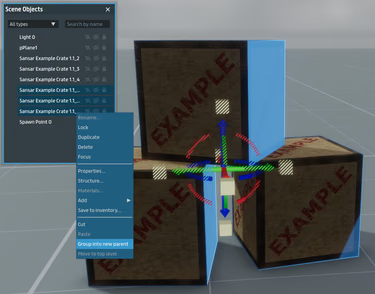
Select multiple objects by holding Ctrl, then right-click one of them and choose Group into new parent.
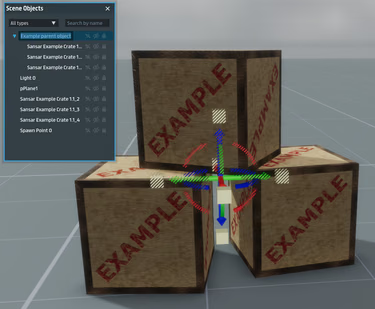
Make sure to give your new parent object a meaningful name. The selected child objects are grouped under the parent object and indented for easy identification.
Removing objects from a parent object
Section titled “Removing objects from a parent object”To move a child object back out of a parent object, right-click it and choose Move to top level.
Cut and paste
Section titled “Cut and paste”You can cut and paste objects between parent objects by selecting them and choosing Cut, then Paste on the destination parent. If you choose to cut a second time before pasting, the previous cut is canceled.
Have more questions? Email help@sansar.com.