
Create
Displacement Guides
what is Displacement?
Section titled “what is Displacement?”Displacement is a new addition in its early release (Oct 2023) it has been added to most of the Sansar shaders and has static and animated forms, it is not intended to replace Normal Map detail as assets would be too high poly for this to be effective, it is however able to manipulate mesh and create animations within the edit mode without the original upload files.
Please note, the displacement will move the existing vertices of the mesh according to the displacement map color, corresponding with the same vertex location on the UV map, but it will not create new vertices or the appearance of having more vertices, like pixel shaders do.
How to use displacement
Section titled “How to use displacement”The sansar displacement shader can be used in multiple ways we have defined it with two methods, a simple method and a Advanced method
Local and Tangent Space
Section titled “Local and Tangent Space”A checkbox on the Animated shaders allows the Displacement to affect the mesh differently.\
Local Object Space: takes into account what the original model was exported with as its transform position (this can be different to what the sansar editor gizmo displays)
UV Tangent Space: takes into account the direction of the face normals of the model.
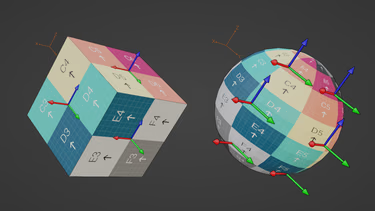
Local Object Space
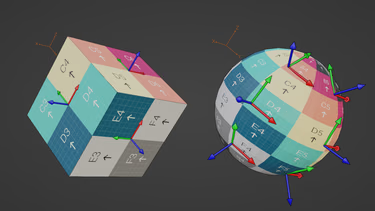
UV Tangent Space
Have more questions? Email help@sansar.com.