
Explore
Body Tracking Vive
You can use VIVE Trackers to track the positions of your right foot, left foot, and waist for improved body tracking and avatar movement in Sansar.
| An avatar dancing in Sansar with full body tracking in VR. |
VIVE tracker setup
For each tracker:
-
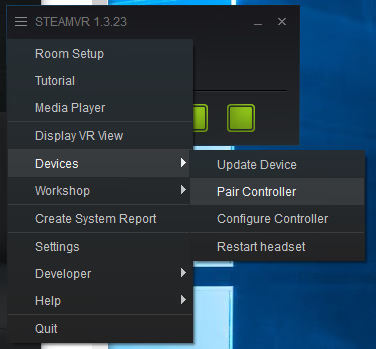
In SteamVR, choose Devices > Pair Controller.
Choose Devices > Pair Controller. -
Hold down the VIVE Tracker’s button until it syncs with SteamVR.
-
Follow the onscreen setup instructions to complete pairing the Tracker.
To set up each tracker for use in Sansar:
- Launch Sansar.
- In SteamVR, choose Devices > Configure Controller. If you are prompted to choose an application, choose Sansar.
- Each of the trackers you have just set up should appear as “Vive Tracker in Hand”. Select one and then click Manage.
- On the Manage Trackers page, click Held in Hand and change it to one of the following:
- Left foot
- Right foot
- Waist
- Repeat this process for the remaining trackers until you have set one Tracker each for Left foot, Right foot, and Waist.
Known issues
As of April 30, 2019, there is a bug in SteamVR can cause VIVE Trackers to become unrecognized in Sansar. To work around this issue:
- In SteamVR, choose Devices > Configure Controller.
- Under Current Binding, click Edit.
- Add, then remove any button mapping. You can add a button mapping by clicking the Power + symbol.
- Select Edit action pose and set it to Unused, then back to Pose.
- Save your local changes and go back to Sansar.
Have more questions? Email help@sansar.com.