# Redelivering Lost Purchases

### Redelivering lost purchases

If you ever lose or delete an item purchased from the [Sansar Store](https://docs.sansar.com/latest/sansarstore/using-the-sansar-store/buying-items-from-store), you can redeliver it from its listing page.

### Redelivering from the Store panel

To redeliver a lost purchase from the Store panel in Sansar:

1. Open the Store by choosing **Shop > Scene creation** or **Shop > Avatar looks**.
2. Search the Store for the listing of the item you would like to redeliver, and click the listing to open it.
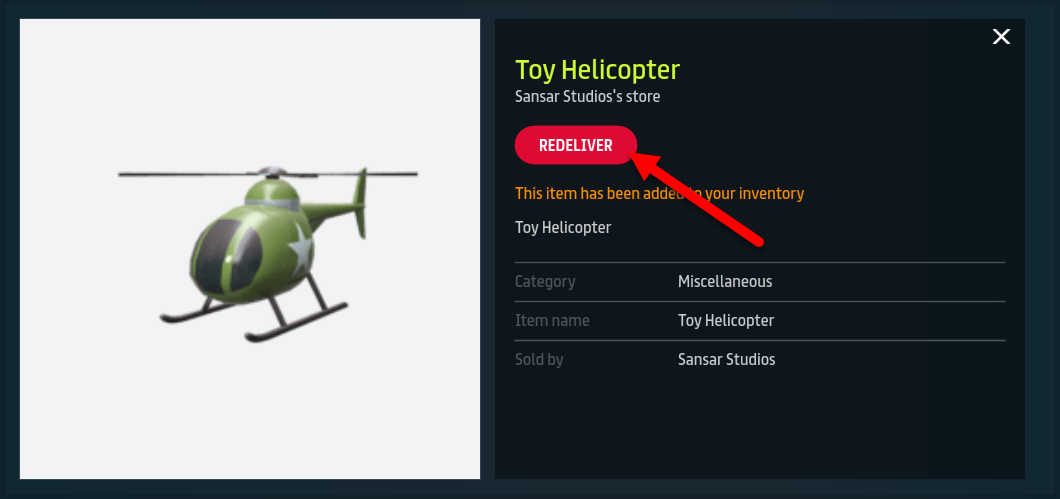
3. In place of the **Buy** or **Get** button, there is a **Redeliver** button. Click **Redeliver** to instantly deliver a new copy of the item to your inventory. For items under Avatar looks, such as avatars, clothing, and emotes, the button is **Wear it now** instead of **Redeliver**.

**Note:** Avatar-related items are redelivered when you click **Wear it now** if there are no copies currently in your inventory.

<figure><img src="https://1251409636-files.gitbook.io/~/files/v0/b/gitbook-x-prod.appspot.com/o/spaces%2FeFXiTZShM8YWMV94n1eV%2Fuploads%2Fgit-blob-6d99b686e67d537e087db5578fccc01c9ec7c983%2FRedeliver-01.png?alt=media" alt=""><figcaption><p>In the Store listing for an item you have purchased, the <strong>Buy</strong> or <strong>Get</strong> button becomes <strong>Redeliver</strong>.</p></figcaption></figure>

***

### Redelivering from the web

To redeliver a lost purchase from the Sansar Store on the web:

1. Visit the [Sansar Store on the web](https://www.sansar.com/store).
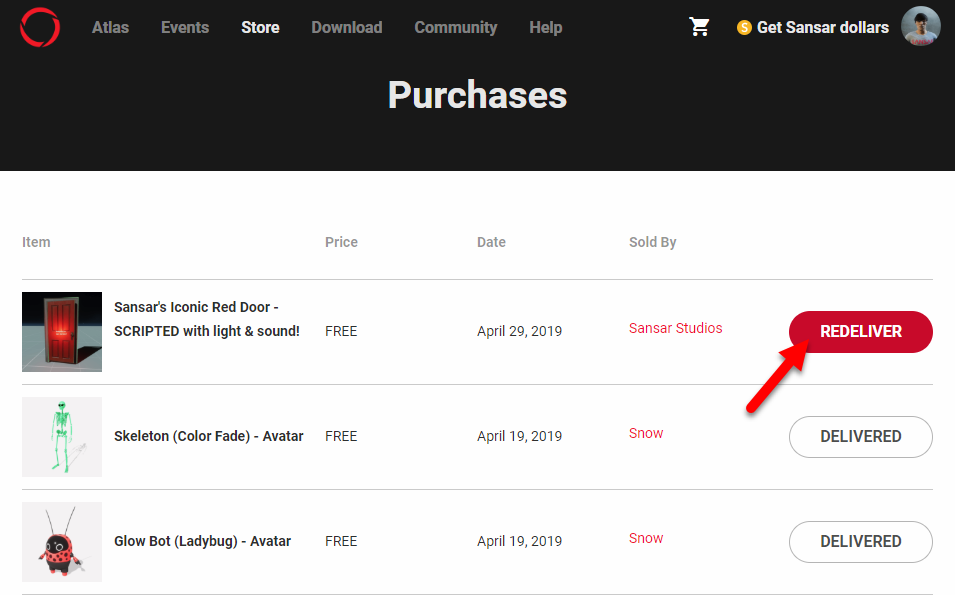
2. Click your profile image in the top-right of the page and select **Purchases** to view all past Store purchases.
3. Locate your purchased item and move your mouse cursor over the **Delivered** button to change it to **Redeliver** and click **Redeliver** to instantly deliver a new copy of the item to your inventory.

<figure><img src="https://1251409636-files.gitbook.io/~/files/v0/b/gitbook-x-prod.appspot.com/o/spaces%2FeFXiTZShM8YWMV94n1eV%2Fuploads%2Fgit-blob-a8a603e28ea56fc51b979303eb0dfecea6cfd0fb%2Fredeliver-02.png?alt=media" alt=""><figcaption><p>While viewing your purchase history on the web, move your mouse over a <strong>Delivered</strong> button to change it to <strong>Redeliver</strong>. Click to redeliver the selected item</p></figcaption></figure>

***