> For the complete documentation index, see [llms.txt](https://docs.sansar.com/latest/llms.txt). Markdown versions of documentation pages are available by appending `.md` to page URLs; this page is available as [Markdown](https://docs.sansar.com/latest/sansarbasics/controls/game-controller-buttons.md).
# Game Controller Buttons
These controls are for use with the optional Xbox One or Xbox 360 game controller. To see available controls using other controllers, see [Sansar controls](/latest/sansarbasics/controls.md)
## Controls for visiting worlds
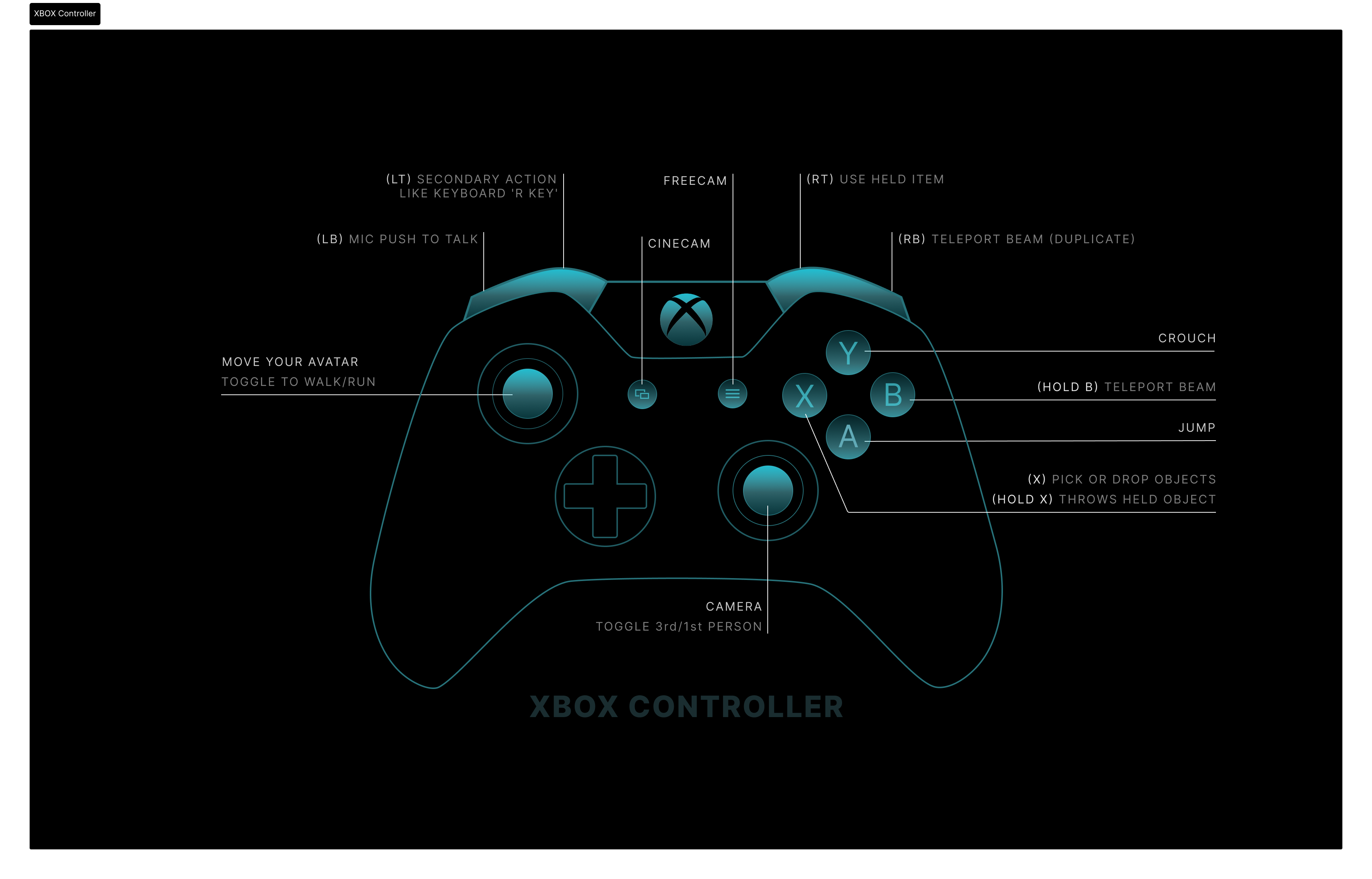
* **A Button (A)** - Jump
* **B Button Held (B)** - Teleport beam
* **X Button (X)** - Interact/ pickup or drop object
* **X Button Held (X)** - Throws held object
* **Y Button (Y)** - Crouch
* **Left Bumper (LB)** - Mic push to talk
* **Right Bumper (RB)** - Teleport beam (DUPLICATE)
* **Left Trigger (LT)** - Secondary action like keyboard 'R Key'
* **Right Trigger (RT)** - Use held item
* **Back** - Cinecam toggle like F10
* **Start** - Freecam toggle like F4
* **Left Stick** - Movement
* **Right Stick** - Camera
* **Left Stick Press (LS - Press)** - Toggle walk / run
* **Right Stick Press (RS - Press)** - Toggle 3rd / 1st person
**While throw object is active**
* **Right Stick** - Changes trajectory
**While teleport beam is active**
* **Left Stick** - Moves target location
* **Right Stick** - Changes direction you will face when landed
## FreeCam and CineCam Controls AKA F4Cam or F10Cam
* **Back** - Cinecam toggle like F10
* **Start** - Freecam toggle like F4
* **X Button (X)** - Drops avatar at cam location
* **Y Button (Y)** - Speed up cam
* **B Button (B)** - Slow down cam
* **Left Trigger (LT)** - Lower cam
* **Right Trigger (RT)** - Raise cam
* **Left Bumper (LB)** - Mic push to talk at avi
Have more questions? Join our [Discord!](https://discord.gg/sansarofficial)
---
# Agent Instructions
This documentation is published with GitBook. GitBook is the documentation platform designed so that both humans and AI agents can read, navigate, and reason over technical content effectively. Learn more at gitbook.com.
## Querying This Documentation
If you need additional information that is not directly available in this page, you can query the documentation dynamically by asking a question.
Perform an HTTP GET request on the current page URL with the `ask` query parameter, and the optional `goal` query parameter:
```
GET https://docs.sansar.com/latest/sansarbasics/controls/game-controller-buttons.md?ask=&goal=
```
`ask` is the immediate question: it should be specific, self-contained, and written in natural language.
`goal` is optional and describes the broader end goal you are ultimately trying to accomplish on behalf of the user. GitBook uses it to tailor the answer towards what is most useful for that goal.
The response will contain a direct answer to the question and relevant excerpts and sources from the documentation.
Use this mechanism when the answer is not explicitly present in the current page, you need clarification or additional context, or you want to retrieve related documentation sections.