# Quests

*Quests* are acquired tasks that provide you with rewards for completing their objectives. You can get quests from the *quest givers* named **Agent Animus** and **Agent Forma** at the quest giver terminal in the [Sansar Social Hub](https://www.sansar.com/worlds/sansar-studios/social-hub).

## Getting quests

You can receive quests from the quest givers **Agent Animus** and **Agent Forma** at the terminal in the Sansar Social Hub. To receive quests:

1. Visit the [Sansar Social Hub](https://www.sansar.com/worlds/sansar-studios/social-hub). You can find it in the [Codex](https://docs.sansar.com/latest/exploring-in-sansar/navigateandexplore/codex), or by entering the [portal](https://docs.sansar.com/latest/exploring-in-sansar/navigateandexplore/portals) in your Home world.
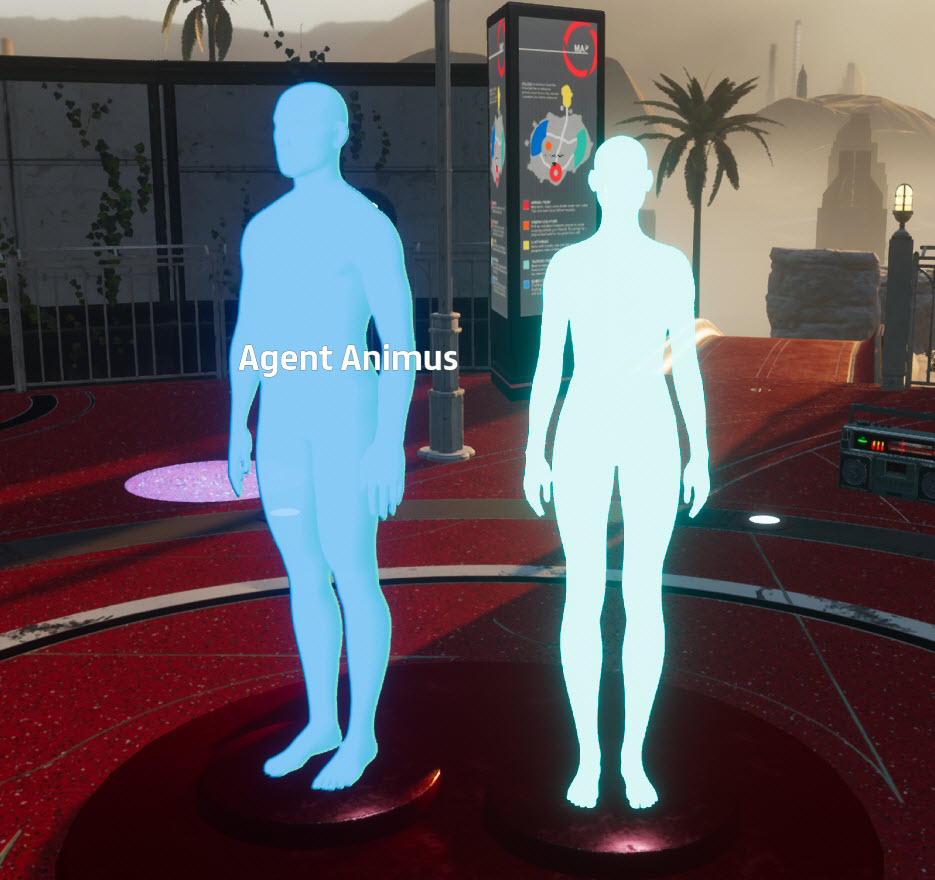
2. In the Sansar Social Hub, find and approach the quest giver terminal, which shows holograms of **Agent Animus** and **Agent Forma**.
3. Click one of the quest givers to receive a quest.
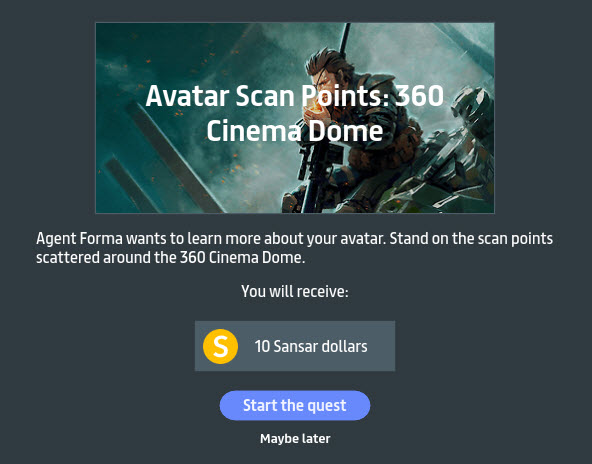
4. Review the quest information and rewards in the panel that appears.
5. Click **Start the quest** to add the quest to your Quests panel and begin tracking its objectives. If you wish do decline the quest, click **Maybe later**.

<figure><img src="https://1251409636-files.gitbook.io/~/files/v0/b/gitbook-x-prod.appspot.com/o/spaces%2FeFXiTZShM8YWMV94n1eV%2Fuploads%2Fgit-blob-dfbcfd19a48fa62cf175f1281804af85c5399292%2Fquests-agents-01.jpeg?alt=media" alt=""><figcaption><p>The quest giver terminal, with holograms of Agent Animus and Agent Forma. Click one of them to receive a quest.</p></figcaption></figure>

<figure><img src="https://1251409636-files.gitbook.io/~/files/v0/b/gitbook-x-prod.appspot.com/o/spaces%2FeFXiTZShM8YWMV94n1eV%2Fuploads%2Fgit-blob-48bb88891c4835b8b90a538befbb3e59ca5cabf9%2Faccept-quest-02.jpeg?alt=media" alt=""><figcaption><p>After interacting with a quest giver, review the quest information and rewards and then click <strong>Start the quest</strong> to add the quest to your Quests panel and begin tracking your objectives. You may click <strong>Maybe later</strong> to decline the quest.</p></figcaption></figure>

## Tracking quest objectives

Your Quests panel tracks your current quests and progress on your quest objectives. To open the Quests panel, choose **Go > Quests** from the main menu.

The Quests panel has two modes: All quests, and quest details.

## All quests

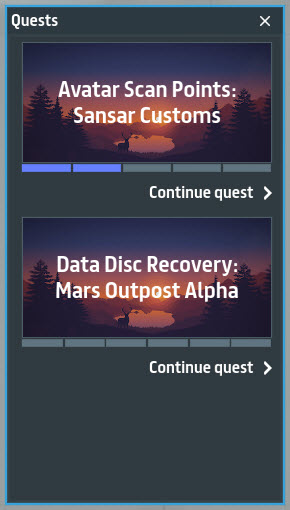
This mode displays all of your current quests. You can view a brief description of the quest by moving your mouse over the quest's thumbnail image.

Progress on quest objectives is shown in bars below the thumbnail. Gray bars represent incomplete objectives, and blue bars represent completed objectives.

Click **Continue quest** to view the quest's objectives and rewards.

<figure><img src="https://1251409636-files.gitbook.io/~/files/v0/b/gitbook-x-prod.appspot.com/o/spaces%2FeFXiTZShM8YWMV94n1eV%2Fuploads%2Fgit-blob-a95a51bbd21d70466f738dc4eb0aea621778c071%2Fall-quests-03.jpeg?alt=media" alt=""><figcaption><p>Showing all quests. Progress on each quest is indicated by the bars underneath the thumbnail images. Click <strong>Continue quest</strong> to view quest details.</p></figcaption></figure>

## Quest details

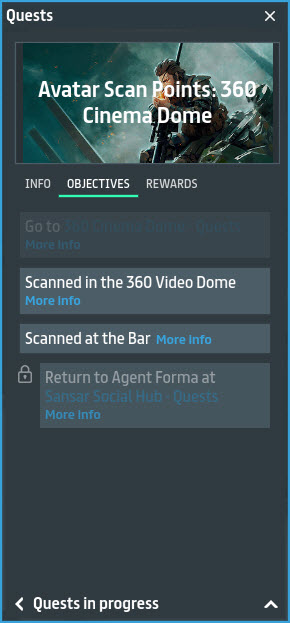
This mode displays all information, objectives, and rewards for completing the selected quest. You can view a brief description of the quest by clicking the **Info** tab. To view the quest's rewards, click the **Rewards** tab. To view your quest objectives, click the **Objectives** tab.

Progress on quest objectives is represented visually for each objective:

* **Objective appears normally** - Objective may be completed.
* **Objective is grayed out** - Objective is locked or has already been completed.
* **Lock icon** - Objective is locked until other requirements have been met. Usually, all other quest objectives must be completed before unlocking the final objective.

While viewing quest details, you can click the **minimize** icon in the lower-right of the panel to condense it into a small tracker, with blue and gray bars representing progress on quest objectives. Blue bars represent completed objectives, and gray bars represent incomplete objectives.

Click **Quests in progress** to return to the list of your current quests.

<figure><img src="https://1251409636-files.gitbook.io/~/files/v0/b/gitbook-x-prod.appspot.com/o/spaces%2FeFXiTZShM8YWMV94n1eV%2Fuploads%2Fgit-blob-683b8798421ccb6a81cc41dd14c4769b92396176%2Fquest-objective-04.jpeg?alt=media" alt=""><figcaption><p>Quest details. Shows progress on all quest objectives, as well as the quest reward. Click <strong>Quests in progress</strong> to return to the list of all quests.</p></figcaption></figure>

***

Have more questions? Join our [Discord!](https://discord.gg/sansarofficial)