# Scene Objects Panel

### The Scene Objects panel

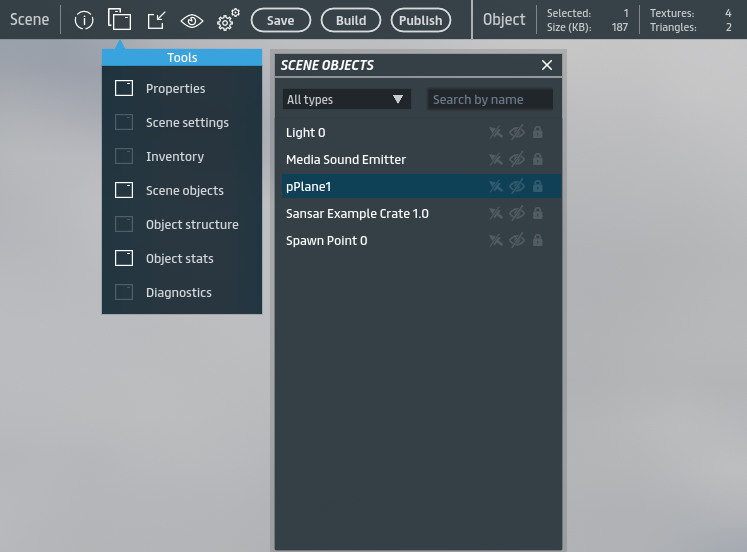
The Scene Objects panel lists every object in your scene. To toggle the Scene Objects panel on or off, choose **Scene Objects** under **Tools** while editing a scene.

<figure><img src="/files/BRYat1NHhjjEA9xcZeBQ" alt=""><figcaption><p>You can toggle the Scene Objects list on and off by clicking <strong>Scene objects</strong> under <strong>Tools</strong>.</p></figcaption></figure>

***

### Search and filter

You can filter the objects shown in the Scene Objects panel by clicking the dropdown (**All types** by default) at the top of the panel. You may also search your objects by typing into the **Search by name** field. To end a search and show all objects again, delete all text from the Search by name field.

### Parent objects

*Parent objects* are a way of organizing a group of objects in a scene such that they can be moved, rotated, and scaled as though they are one object. The parent object itself is not an actual object in the scene, but instead represents its collective *child* objects as a group.

**Note:** Parent objects share many similarities to legacy *folders* in Sansar, with added functionality. For this reason, existing legacy folders and their contents have been converted to parent objects and child objects respectively.

The children of a parent object can still be manipulated independently and retain all their properties as individual objects.

For more information about parent objects, see [Parent objects](https://help.sansar.com/hc/en-us/articles/360025630792).

### Object structure

To view the various components of each object in the Scene Objects panel, right-click an object and choose **Object structure**. For more information about object components, see [Object editing](https://help.sansar.com/hc/en-us/articles/115002206766).

### Toggle visibility and selectability of objects

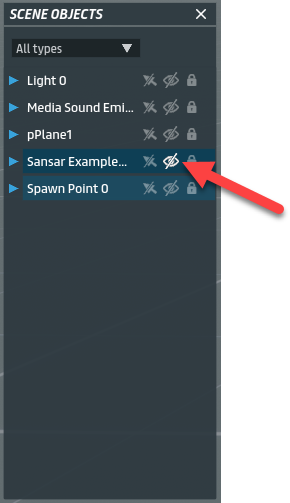
You can toggle an object's visibility in the scene by clicking the **Show/Hide** icon next to its name in the Scene Objects list. If hidden, the object will be invisible in the scene but may still otherwise be moved, rotated, or otherwise manipulated, but cannot be clicked in order to select it.

This feature may be useful if an object in the scene is obscuring your view and making it difficult to work with other objects.

<figure><img src="/files/dLkYfZJMBsJw8GJj31Mi" alt=""><figcaption><p>Click the <strong>Show/Hide</strong> icon to toggle an object's visibility in the scene.</p></figcaption></figure>

***

You can disable or enable an object's selectability by clicking the **Disable/Enable object selection** icon next to its name in the Scene Objects list. If disabled, you will not be able to select the object by clicking on it in the scene.

You may wish to disable an object's selectability if it is obscuring your ability to click on or select another object that is behind or inside it.

<figure><img src="/files/eC4sTLK5iskfdKnsPKtd" alt=""><figcaption><p>Click the <strong>Enable/Disable object selection</strong> icon to toggle an object's selectability.</p></figcaption></figure>

***

You can toggle an object's editability in the scene by clicking the **Lock/Lunlock** icon next to its name in the Scene Objects list. If locked, the object cannot be edited unless it is unlocked.

***

#### Have more questions? Ask in our [Discord!](http://discord.gg/sansarofficial)


---

# Agent Instructions: Querying This Documentation

If you need additional information that is not directly available in this page, you can query the documentation dynamically by asking a question.

Perform an HTTP GET request on the current page URL with the `ask` query parameter:

```
GET https://docs.sansar.com/latest/creating-in-sansar/partoftheworldeditor/scene-object-panel.md?ask=<question>
```

The question should be specific, self-contained, and written in natural language.
The response will contain a direct answer to the question and relevant excerpts and sources from the documentation.

Use this mechanism when the answer is not explicitly present in the current page, you need clarification or additional context, or you want to retrieve related documentation sections.