# Marvelous Designer Integration

## Marvelous Designer integration

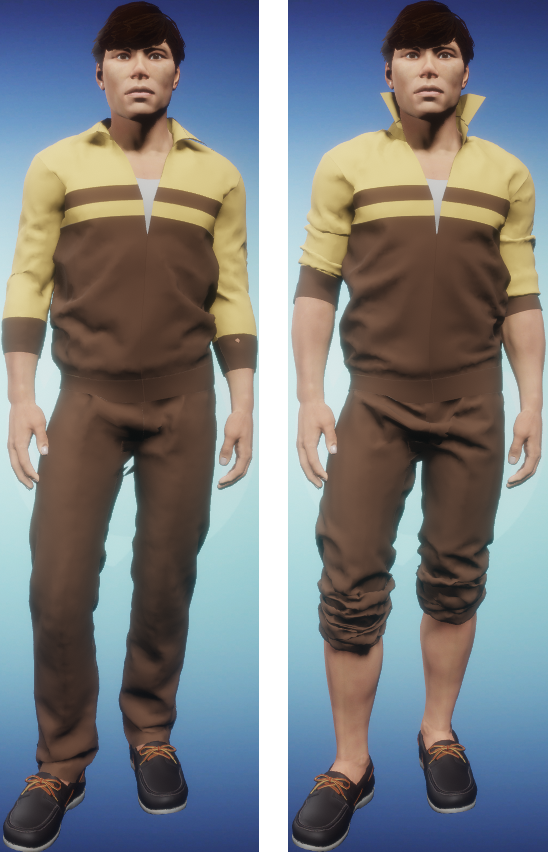
[Marvelous Designer](https://www.marvelousdesigner.com/) is a 3D virtual clothing creation tool that allows you to design clothing by creating patterns, such as those used in sewing. Clothing made in Marvelous Designer can be manipulated using adjust clothing and transformation modes in Sansar's avatar editor, allowing you to customize the way your avatar wears each piece of clothing. For example, you could add a long-sleeved shirt to your avatar in the avatar editor, and then use adjust clothing to roll up the sleeves, smooth out bunches and wrinkles, or pop the collar.

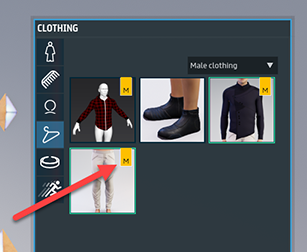
Marvelous Designer clothing can be identified in the Sansar Store by the **Made with Marvelous Designer** banner that appears on relevant listings. While editing your avatar in the avatar editor, Marvelous Designer clothing is identified with an "M" logo on the clothing's thumbnail image.

<figure><img src="/files/MKa0gZBnpcaiBEqJ08XJ" alt=""><figcaption><p>Clothing marked with Marvelous Designer's "M" logo in the Lookbook clothing inventory.</p></figcaption></figure>

***

### **Additional resources**

* See [Fitting Marvelous Designer clothing to your avatar](/latest/avatar-creation/dressing-the-avatar/fitting-designer-clothing-to-your-avatar.md) for information about how to adjust the fit of Marvelous Designer clothing.
* See [Marvelous Designer creator resources](/latest/avatar-creation/avatarresources/avatar-reference-files.md) for default avatar templates and information.
* See [Marvelous import and export](/latest/creating-in-sansar/marvelous-designer-info/marvelous-import-export.md) for information about how to setup for export and import MD clothing to Sansar.

<figure><img src="/files/a5VFIlxPFK1ACegzwxLi" alt=""><figcaption><p>Two images of the same avatar wearing the same Marvelous Designer clothes before and after adjustment in the avatar editor using adjust mode. Note the sleeves, pant legs, and collar.</p></figcaption></figure>

***

**Notes:**

* At this time, you can only adjust or manipulate marvelous designer clothing in the editor. This means that you can use adjust or transformation modes to adjust the fit of your clothing, but the final result will be "baked" into your avatar and the cloth will not continue to simulate while visiting a scene.

***

Have more questions? Join our [Discord!](https://discord.gg/sansarofficial)


---

# Agent Instructions: Querying This Documentation

If you need additional information that is not directly available in this page, you can query the documentation dynamically by asking a question.

Perform an HTTP GET request on the current page URL with the `ask` query parameter:

```
GET https://docs.sansar.com/latest/creating-in-sansar/marvelous-designer-info/marvelous-designer-integration.md?ask=<question>
```

The question should be specific, self-contained, and written in natural language.
The response will contain a direct answer to the question and relevant excerpts and sources from the documentation.

Use this mechanism when the answer is not explicitly present in the current page, you need clarification or additional context, or you want to retrieve related documentation sections.