> For the complete documentation index, see [llms.txt](https://docs.sansar.com/latest/llms.txt). Markdown versions of documentation pages are available by appending `.md` to page URLs; this page is available as [Markdown](https://docs.sansar.com/latest/creating-in-sansar/marvelous-designer-info/marvelous-designer-creator-resources.md).
# Marvelous Designer Creator Resources
## Marvelous Designer creator resources
Using a Sansar avatar model in Marvelous Designer
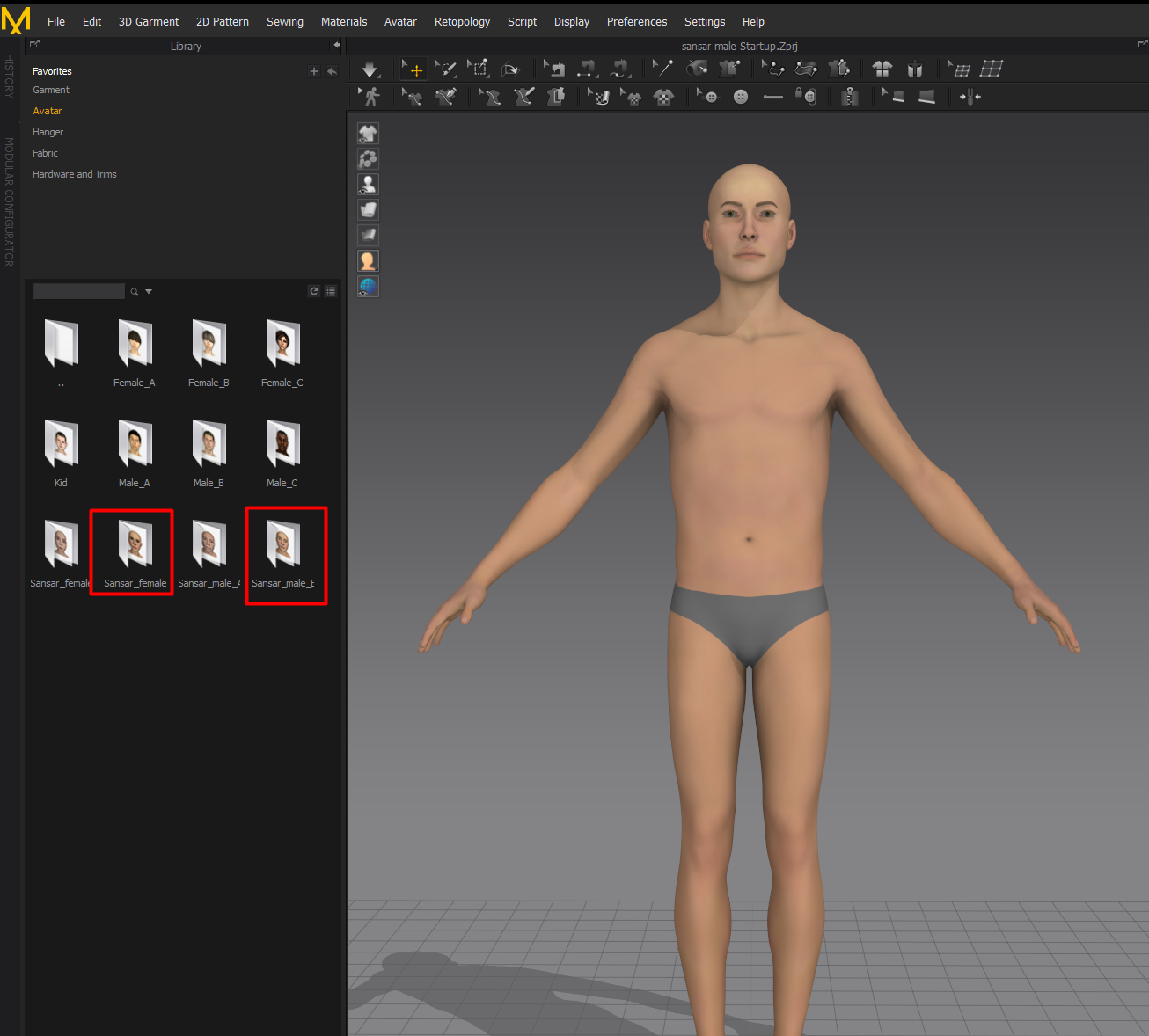
For the best results when designing clothing for Sansar avatars, use one of the provided avatar templates. This ensures that the clothing you create will be fitted to the male or female default avatar in Sansar.
In Marvelous Designer:
In some versions of MD the sansar avatar is included (MD 9 and above). if it is not you can import the default reference files.
1. Choose **File > Import > FBX**.
2. Choose the male or female avatar template provided in [Avatar reference files](/latest/avatar-creation/avatarresources/avatar-reference-files.md#avatar-reference-files).
3. In the Open Avatar panel that appears, make sure to select **cm** as the scale. If you leave it at the default mm setting, the avatar appears too small.
4. Click **Ok** to load the avatar.
5. Close the Avatar Editor panel that appears.
6. You may now begin designing clothing for Sansar avatars.
Avatar model files
Sansar's avatar model files can be found in the article: [Avatar reference files](/latest/avatar-creation/avatarresources/avatar-reference-files.md#avatar-reference-files).
Exporting from Marvelous Designer
For a full setup guide please see [Marvelous Import and Export](/latest/creating-in-sansar/marvelous-designer-info/marvelous-import-export.md)
When you are done creating and fitting your clothing, you can export it in a Sansar-compatible format:
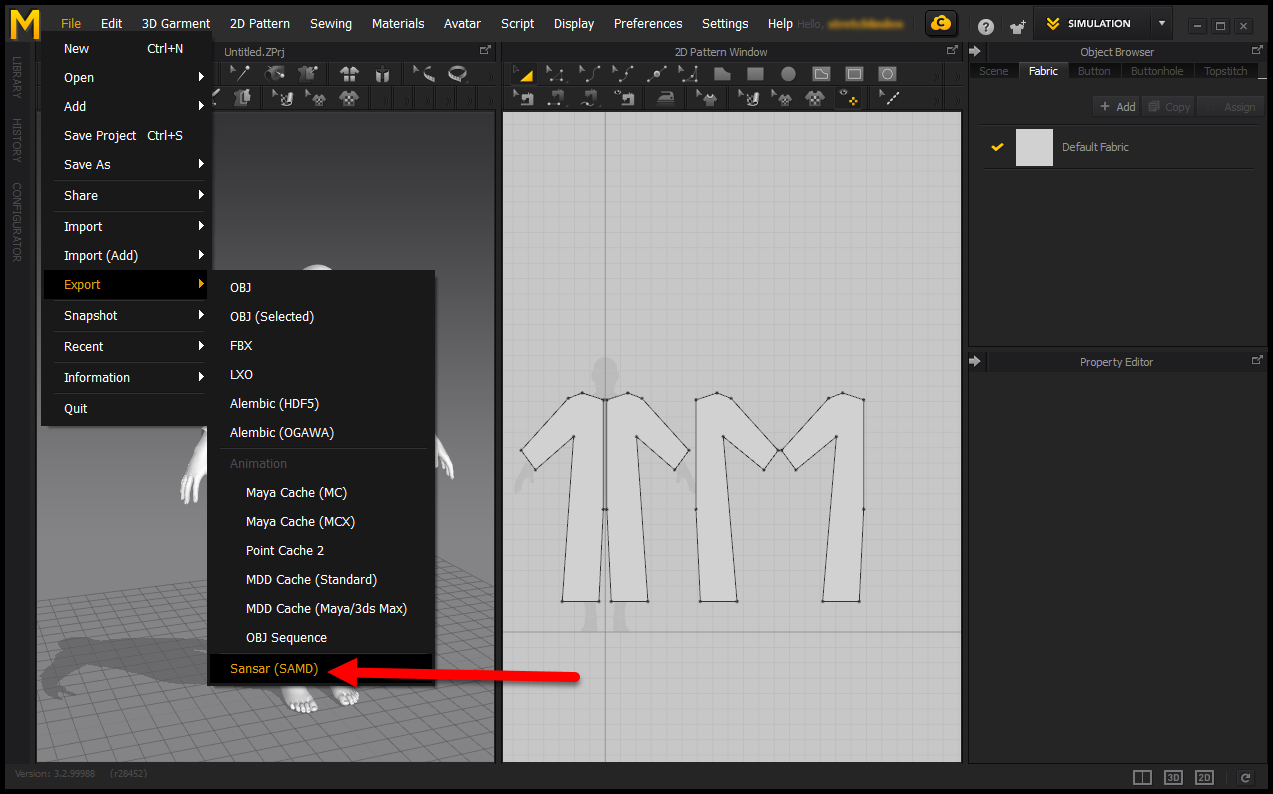
1. Choose **File > Export > Sansar (SAMD)**.
2. Choose a location to save your file, choose a file name, and click **Save**.
3. Your clothing has been exported! You may now [Import it to Sansar](/latest/creating-in-sansar/marvelous-designer-info/marvelous-import-export.md#importing-md-items-to-sansar) to either wear or sell.
Export Sansar clothing from Marvelous Designer by choosing File > Export > Sansar (SAMD).
***
Have more questions? Join our [Discord!](https://discord.gg/sansarofficial)
---
# Agent Instructions
This documentation is published with GitBook. GitBook is the documentation platform designed so that both humans and AI agents can read, navigate, and reason over technical content effectively. Learn more at gitbook.com.
## Querying This Documentation
If you need additional information that is not directly available in this page, you can query the documentation dynamically by asking a question.
Perform an HTTP GET request on the current page URL with the `ask` query parameter, and the optional `goal` query parameter:
```
GET https://docs.sansar.com/latest/creating-in-sansar/marvelous-designer-info/marvelous-designer-creator-resources.md?ask=&goal=
```
`ask` is the immediate question: it should be specific, self-contained, and written in natural language.
`goal` is optional and describes the broader end goal you are ultimately trying to accomplish on behalf of the user. GitBook uses it to tailor the answer towards what is most useful for that goal.
The response will contain a direct answer to the question and relevant excerpts and sources from the documentation.
Use this mechanism when the answer is not explicitly present in the current page, you need clarification or additional context, or you want to retrieve related documentation sections.