> For the complete documentation index, see [llms.txt](https://docs.sansar.com/latest/llms.txt). Markdown versions of documentation pages are available by appending `.md` to page URLs; this page is available as [Markdown](https://docs.sansar.com/latest/creating-in-sansar/creatortools/creating-a-world.md).
# Creating a World
This is a step-by-step walkthrough of how to create a new world:
* In the main menu on the left-side of the screen, click **Create** to open the creation sub-menu.
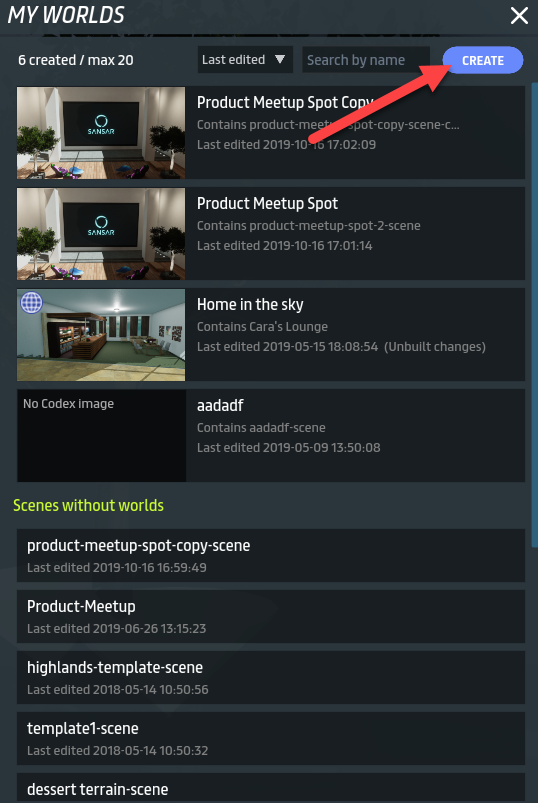
* In the sub-menu that appears, click **Build worlds**. This opens the [My worlds panel](/latest/creating-in-sansar/creatortools/my-worlds-panel.md).
* Press **Create** on the upper right corner of the panel to create a world.
Click Create to create a new world.
***
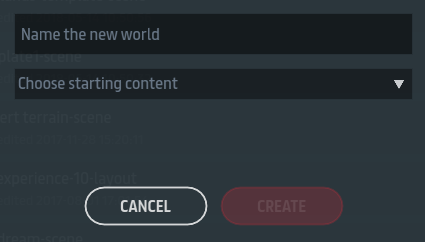
* This opens the **World Configuration** dialog. In the **Name the new world** input field, enter a world name for your new project.
The Choose starting content dropdown includes your own created scene templates in addition to the Sansar default scene templates.
***
* In the same dialog, click the **Choose starting content** dropdown to select from a list of scene templates.
**Note:** You can choose one of your existing scenes as the starting content for the new world. This uses the existing scene as a starting template and allows you to experiment with the scene without affecting any other existing scenes or worlds.
* The **Create** button is enabled once you have a world name and a scene template selected. Click **Create** to make your world and add it in the [My worlds panel](/latest/creating-in-sansar/creatortools/my-worlds-panel.md), where you can access it at any time.
***
#### Have more questions? Ask in our [Discord!](http://discord.gg/sansarofficial)